How To Verify Members 💜
Verification confirms members are 18+ before they can access our adult channels and events. Full server access comes from the @Eden Verified role (formerly called "Verified"). This page covers everything staff need, from the ticket opening to the ticket closing.
Since July 1, 2026 at 2:00 PM EST, VRChat age cross verification no longer grants server access. Cross-verifying now gives @Blocked VRC Verified ❌, and existing VRC Verified members received that role automatically on that date. To get @Eden Verified, members must complete Regular ID verification or Fansly cross verification.
How It Works
One verification ticket
- TicketMember opens it
- ImagesID + selfie
- First checkCutie Helper
- Second checkModerator
- CleanupTranscript + delete
- The member opens a ticket in 🎫open-a-ticket and picks Regular ID, VRChat (Temp Disabled), or Verify Using Fansly.
- If they see No Access, direct them to 💠𝘙ules.
- Members who are VRC Verified or Fansly Verified can also open a verification ticket to get @Eden Verified.
- The verification steps are auto-posted in the ticket. The member posts their images there.
- Staff check the images with the checklist, then complete the first check with
/verify. - A Moderator does the Second Verification.


Verification Methods
Regular ID
Preferred method. A government-issued IDi plus a selfie holding it.
- Requirements are in Documents & image requirements
- Grants @Eden Verified once staff complete it
Verify Using Fansly
Alternative cross verification through Fansly creator verification.
- The member creates a Fansly account and verifies as a creator
- A blue checkmark on their Fansly profile means they are ready
- Creator verification usually takes 1 hour to a few hours
- Button on the ticket panel:
VRChat (Temp Disabled)
No longer grants server access — kept in case we revert this decision.
- Needs an active VRC+ subscriptioni and a linked account ()
- Button:
- Assigns @Blocked VRC Verified ❌ — does not unlock the server
- Linking details: 📱|linking-with-vrchat
If a member is unable to complete the verification in the normal way due to some physical limitation, accomodation in the form of a video call is possible as an alternative: see Camera Verification.
Timeframe and Who Does What
- Verify within 12 hours of the member posting their ID, and no later than 24 hours. We aim to have every verification fully sorted in under 36 hours.
- @Cutie Helper handle the initial verification. After the 10-hour mark, @Moderator can step in, but it's better for Cutie Helpers to handle initial verifications to gain experience.
- The second review and the ticket closure are done by a @Moderator only.
- The same staff member must not do both the initial verification and the final closure.


Prompt verification lets new members join the community quickly while keeping our safety standards.
Verification Checklist
Verification Process Steps
0/6 completed
Completing the First Check
When every item on the checklist is good, run /verify inside the verification ticket. It has no options:

You can also press on the ticket in the Orion Board. See Orion Board: Verification.
What Orion does:
- Gives the member @Eden Verified and removes @Unverified. Staff cannot assign Eden Verified by hand.
- Removes the old cross-verification roles if the member had them (@VRC Verified, @Blocked VRC Verified ❌, Fansly verified).
- Replies to you privately: ✅ Initial verification completed successfully!
- Posts the welcome message in the ticket for the member, so you no longer need to write one:

Admins can edit this text in Orion's bot settings. The last line names the staff member who did the first check.
Orion refused the /verify?
| Orion says | Why |
|---|---|
| This command can only be used in a ticket thread / in verification tickets. | Run it inside the member's verification ticket. |
| Ticket opener already has an age verified role | The member is already verified. |
| Ticket opener must have the unverified role, VRChat verified role, Blocked VRC Verified role, or Fansly verified role | The member's roles don't match a pending verification. Ask a Moderator. |
| Cutie Helpers can only verify tickets with status NEW or ID_RECEIVED… | The first check is already done. The next step is the Moderator's second check. |
| This verification ticket was closed as incomplete… | The member was verified another way; nothing to do. |
Documents & Image Requirements
Only accept official government-issued identification documents.
✓Accepted Documents
- Driving Licenses, Identity Cards, Passports (most common and preferred)
- Military IDs (accepted but discouraged due to security concerns)
- Insurance Cards and Medication IDs (only if government-issued and recognized as official ID in that country)
Conditionals
- Expired IDs are fine if expired for one year or less and the photo matches the selfie
- Birth Certificates only as a supplement to a photo ID that does not show the date of birth, or to an expired ID with a picture (never as the main document)
✗Not Accepted
- Temporary Paper IDs
- Private Organization IDs (e.g., bus IDs)
- School IDs (unless provided by a government body)
- IDs without online examples (we can't check them)
- Birth Certificates as the main document
- Digital IDs
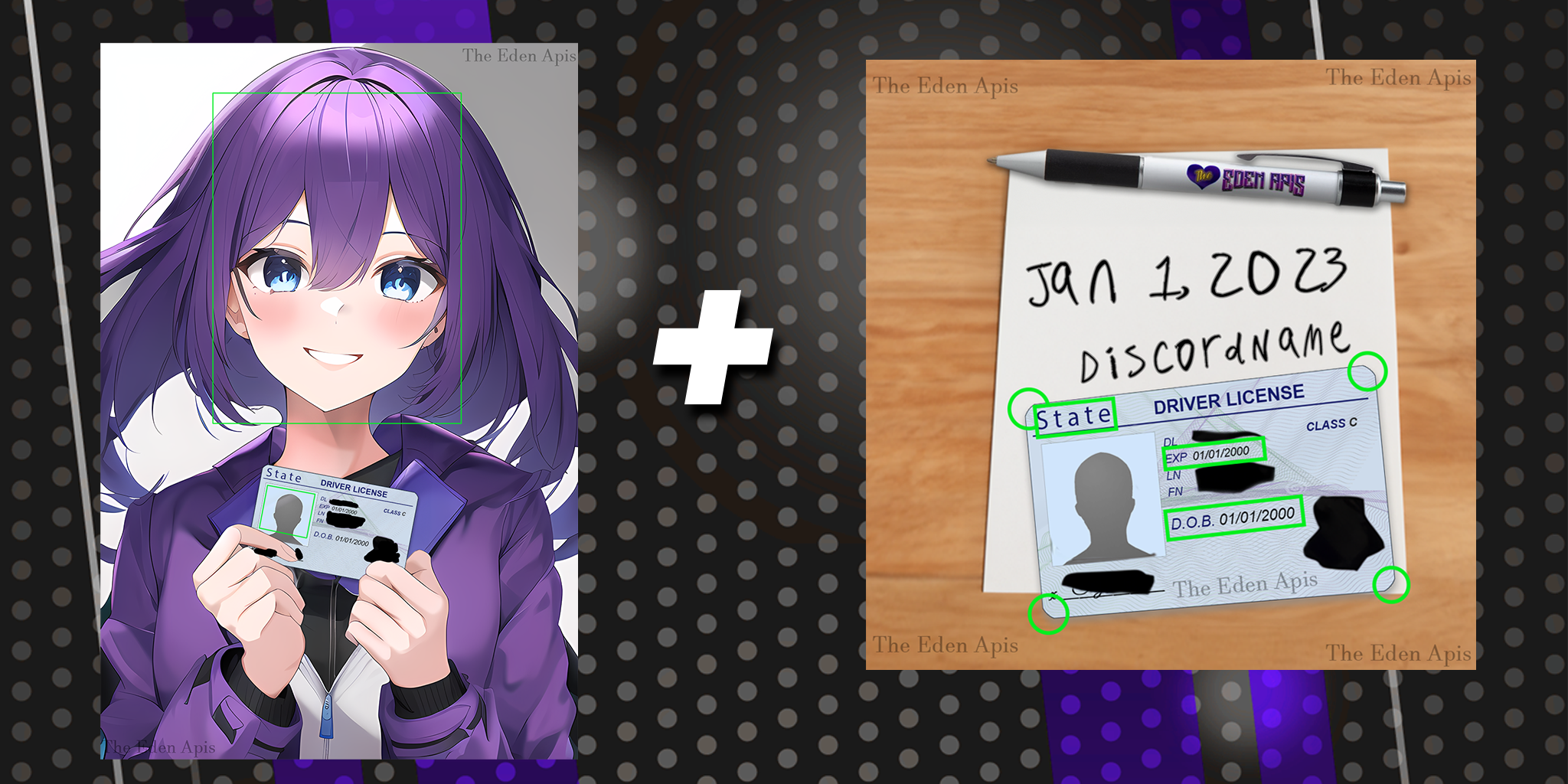
The images must show:
- A selfie holding the ID, with the face matching the ID photo
- The date of birth, expiry date, and issuing bodyi
- All four corners of the ID
- Sunglasses, or censoring the eyes, are allowed in the selfie. The eyes on the ID may also be censored.
Ask fellow Moderators, or compare it with online examples through a Google search.
Example of a valid verification
Privacy & Data Handling
Our members' privacy and security are our top priorities.
- A text-only transcript is generated and sent to the member.
- The verification ticket is completely deleted, including every attachment.
- No sensitive information is stored outside Discord.
For security-related questions, open a staff-talk ticket in 🎫open-a-ticket.
After Verification
@Eden Verified unlocks the exclusive channelsi and adult events, for example: 📄𝘕𝘚𝘍𝘞-𝘉ios 🔞kink-sharing 🎮vr-name-sharing 📸lewd-vr-pics 👾avatar-creators 🎨avatar-support
🛡️Next: Second Verification (Moderators)
The second check, closing the ticket, reminders, and what to do if images get deleted.
Troubleshooting
The member cross-verified with VRChat but has no server access
This is expected since July 1, 2026.
- Check 🔗-vrchat-age-logs to confirm they cross-verified. They should have @Blocked VRC Verified ❌.
- Direct them to a verification ticket in 🎫open-a-ticket for Regular ID verification, or to Verify Using Fansly on the ticket panel.
- Do not manually assign @VRC Verified — that role no longer grants access.
The member has VRC Verified but no access
Existing VRC Verified members received @Blocked VRC Verified ❌ automatically on July 1, 2026. They need Regular ID verification or Fansly cross verification to get @Eden Verified. When you complete their verification, Orion removes the VRC Verified roles on its own.